معرفة تقنية المعلومات | بيع وتأجير وصيانة معدات الأمن
دليل CEIA PMD2 Plus: دليل عملي لتجهيز نقطة التفتيش الأمنية الخاصة بك
عند تجهيز مدخل منشأة أو تنظيم فعالية، ستحتاج إلى معدات فحص تتناسب مع إجراءات الأمن لديك، وتدفق الزوار، وظروف التركيب. جهاز الكشف عن المعادن CEIA PMD2 Plus هو جهاز كشف معادن للمرور، مصمم لفحص الأشخاص، مع مؤشرات تعتمد على الموقع تساعد المشغلين على توجيه عمليات فحص إضافية عند الحاجة.
إن اختيار جهاز CEIA PMD2 Plus يتجاوز مجرد مقارنة أسماء الأجهزة أو أسعار الشراء. يجب أن يتناسب التكوين المقترح مع الموقع، مع ضرورة تحديد التركيب والتدريب والدعم الفني بوضوح. يربط العرض المفيد الجهاز باحتياجاتك الفعلية، ويوضح مسؤوليات كل طرف قبل بدء التشغيل.
هذا الدليل مُعدٌّ لمديري الأمن، ومديري المرافق، وفرق المشتريات، ومنظمي الفعاليات. ويتناول المواصفات التي تستحق المراجعة، والاختلافات بين تقنيات الفحص، واعتبارات الشراء والتأجير، ومتطلبات التركيب، وترتيبات الصيانة، والأسئلة التي يجب طرحها قبل قبول أي عرض سعر.
تقدم شركة IT Knowledge خدمات توريد وتركيب أنظمة الأمن وتأجير المعدات. يمكنك مناقشة نظام CEIA PMD2 Plus مع فريقنا وطلب عرض سعر يوضح التكوين والملحقات والتركيب والتدريب والدعم المشمول. يُرجى التأكد من التوافر ومواعيد التسليم عند تقديم طلبك.
ما الذي يجب عليك تحديده قبل طلب جهاز كشف المعادن؟
حدد الموقع، وعدد المداخل، وفترة الاستخدام، وأوقات الذروة، والمتطلبات التي تحددها الجهة المسؤولة عن الأمن. ثم اطلب عرض سعر يربط جهاز الكشف عن المعادن بتلك الاحتياجات، مع توضيح التكوين، وقائمة الملحقات، ونطاق الخدمة، والجدول الزمني. لا تفترض أن جميع الميزات المتوفرة ضمن فئة منتجات معينة مضمنة في كل وحدة يتم توريدها.
محتويات
ما هو جهاز CEIA PMD2 Plus؟
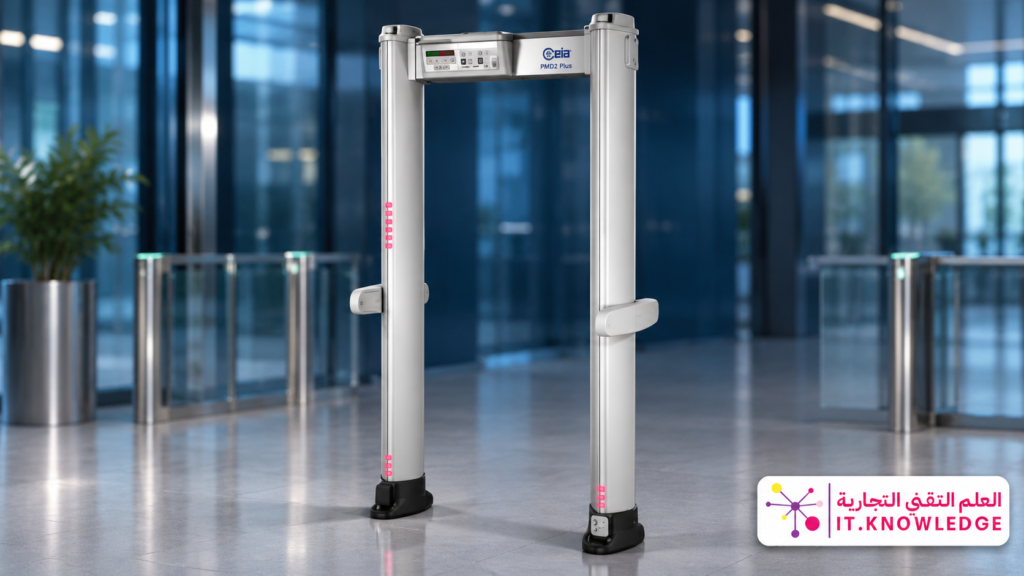
جهاز الكشف عن المعادن CEIA PMD2 Plus هو جهاز متعدد المناطق يُستخدم كجزء من إجراءات فحص الأفراد. عند مرور الشخص عبر فتحته، يُصدر النظام إشارات بناءً على إعداداته والأجسام المعدنية التي تم اكتشافها. تساعد الإشارات المستندة إلى الموقع المشغل على تحديد المنطقة التي تتطلب مزيدًا من الفحص وفقًا لإجراءات الفحص المعتمدة في المنشأة.
تُقدّم الشركة المصنّعة هذه السلسلة مزوّدة بميزات الكشف والتمييز والبرمجة الأمنية. مع ذلك، يعتمد الأداء عند مدخل معيّن على التكوين المُقدّم، والبرنامج المُعتمد، وبيئة التركيب، وتدريب المُشغّل، وترتيبات الفحص. لذا، ينبغي تقييم المعدات ضمن ظروف التشغيل المُخصّصة لها.
هل ينتج صورًا بالأشعة السينية للأشخاص أو الحقائب؟
جهاز CEIA PMD2 Plus ليس نظام تصوير بالأشعة السينية ولا يعرض صورًا لمحتويات الحقيبة. وظيفته هي الكشف عن الأجسام المعدنية التي يحملها الشخص أثناء مروره عبر الجهاز. قد تتطلب عمليات فحص الأمتعة وغيرها من مهام التفتيش تقنيات وإجراءات مختلفة.
عند التواصل مع المورد، اشرح المهمة المطلوبة، لأن مصطلح “معدات الفحص الأمني” قد يشمل عدة تقنيات مختلفة. ولا يُغني جهاز الكشف عن المعادن عن جميع طرق الفحص الأخرى. يمكنك مناقشة العلاقة بين المعدات المطلوبة من خلال خدمات أنظمة الأمن المتكاملة التي تقدمها شركة IT Knowledge ، مع تحديد دور ومسؤولية تشغيل كل مكون.
هل كل إنذار يشير إلى وجود تهديد؟
يتطلب الإنذار استجابةً وفقًا لإجراءات الموقع، ولكنه لا يُحدد بشكلٍ مستقل هوية الجسم أو مستوى خطورته. قد تؤثر الأدوات المعدنية الشخصية على الاستجابة تبعًا للإعدادات المُختارة. لذا، تتطلب بوابات فحص الأفراد مُشغلين مُدربين وإجراءات واضحة للتحقق والتفتيش الإضافي.
ينبغي أن يشمل التدريب على جهاز CEIA PMD2 Plus شرح معنى مؤشراته وحدودها، وكيفية استجابة المشغل للإنذار، ومتى يجب إشراك المشرف أو الدعم الفني. تساعد الإجراءات الموثقة في الحفاظ على نهج متسق بين الورديات وتقليل الاعتماد على التفسير الفردي.
يتطلب الفحص الفعال نقطة تفتيش منظمة
يُعدّ جهاز الكشف جزءًا من عملية أوسع تشمل إدارة الدخول، والصفوف، والأمتعة الشخصية، وعمليات تفتيش إضافية. ناقش سير العمل بالكامل وحدد مسؤوليات المشغلين والفنيين. لا تكفي مواصفات المعدات وحدها لتحديد جاهزية المدخل للاستخدام.
من ينبغي عليه التفكير في استخدام جهاز كشف المعادن الذي يمكن المرور من خلاله؟
يمكن النظر في استخدام جهاز CEIA PMD2 Plus في المواقع التي تتطلب الكشف عن المعادن للأفراد وفقًا لسياسة أمنية محددة. تختلف المتطلبات باختلاف المنشأة، وعدد الزوار، وتصميم المدخل، وفترة التشغيل، والإجراءات المعتمدة. لا ينبغي افتراض أن التكوين المناسب لمنظمة أخرى مناسب لموقعك تلقائيًا.
فرق الأمن والمرافق تخضع للفحص اليومي
لضمان التشغيل المنتظم، واستمرارية الخدمة، والتدريب على المناوبات، وسجلات المعدات، يُولى اهتمام خاص. عند شراء جهاز CEIA PMD2 Plus، اطلب شروط الضمان المكتوبة، وترتيبات الصيانة، وآلية الدعم الفني. حدد الشخص المسؤول داخل المنشأة عن مراقبة المعدات، وتسجيل المشكلات، وتنسيق طلبات الخدمة.
Conference, exhibition and event organizers
Event requirements depend on arrival patterns, entrance numbers and the time available for setup. Metal detector rental may suit temporary use, provided the quotation defines the rental period, installation, testing, removal and support. Review IT Knowledge’s security equipment rental services and confirm the required equipment and dates when requesting availability.
Procurement teams and operating contractors
Procurement teams should establish a common specification before comparing quotations. Request the configuration name, accessories and technical documentation, then distinguish included services from optional items. This makes it easier to determine whether a price difference relates to the CEIA PMD2 Plus configuration, service scope or delivery terms.
| Customer Type | Main Priority | What to Clarify |
|---|---|---|
| Daily-use facility | Consistent operation and clear procedures. | Training, warranty, maintenance and support. |
| Temporary event | Readiness before visitors arrive. | Delivery, installation, testing and rental dates. |
| Multi-entrance project | Equipment coordination and pedestrian flow. | Layout and technical site requirements. |
| Procurement department | Comparing equivalent proposals. | Configuration, accessories and written exclusions. |
Define Your Site Requirements Before Requesting a Quotation
Describe the location and how the entrance will be used. Is it indoors or outdoors? Is the requirement permanent or temporary? How many entry points are involved, and when do visitors arrive? This information supports a practical assessment of the CEIA PMD2 Plus and identifies details requiring a site visit or technical confirmation.
Will one detector be enough?
The required quantity cannot be determined from total attendance alone. Visitors arriving throughout the day create a different demand from the same number arriving within a short period. Additional inspection procedures, staffing and queue arrangements also affect checkpoint capacity and should be considered before selecting equipment quantities.
Do not convert equipment response speed into a guaranteed number of people screened. Explain peak arrival periods and the available admission window, then request an assessment reflecting your procedures. You can explore options through IT Knowledge’s security gate services.
What information should you send?
- City, installation location and facility type.
- Entrance photographs and available dimensions.
- Number of entrances and expected arrival patterns.
- Purchase or rental preference and required period.
- Target installation and operating dates.
- Existing equipment requiring coordination.
- Training, technical support and maintenance requirements.
- Specifications required by the organization responsible for security.
For metal detector maintenance enquiries, include the model, symptoms and available service history. Explain any recent relocation or site changes that may relate to the issue. This information helps define the next step and inspection scope, while a technical assessment remains necessary to diagnose the cause.
Discuss Your Requirements with IT Knowledge
For CEIA PMD2 Plus sales, rental and maintenance enquiries, share your site details and required dates. Request a technical and commercial proposal defining the equipment, accessories and services included.
CEIA PMD2 Plus Specifications: What Should You Review?
Start your assessment of the CEIA PMD2 Plus with the features relevant to your site: alarm localization, signal visibility, security programming, access permissions and installation requirements. Then review connectivity, accessories and service options, distinguishing the standard equipment from items that require a separate order.
The product family includes different configurations, so a general specification list should not be treated as a description of every supplied unit. Request the complete configuration name, technical data sheet, dimensional drawing and accessory list. These documents help you compare the proposed walk-through metal detector with your project requirements.
| Specification | Key Information | What to Confirm |
|---|---|---|
| Equipment category | Multi-zone walk-through metal detector for personnel screening. | Exact model and configuration included in the quotation. |
| Alarm localization | 60 zones: 20 vertical levels × 3 lateral positions. | Indicator visibility and how operators interpret the signals. |
| Security programs | Up to 50 built-in programs, according to manufacturer information. | Available programs and suitability for the facility’s requirements. |
| Alarm indications | Configurable visual and audible signals. | Visibility and audibility under actual site conditions. |
| Chip Card system | Card-based management of selected operating parameters and security levels. | Included cards and authorized user permissions. |
| Met-Identity technology | Information concerning the predominant composition of detected metal. | Availability in the quoted configuration and interpretation of its indications. |
| Dimensions and passage width | Depend on the model and configuration. | Dimensional drawing, installation footprint and circulation requirements. |
| Connectivity and accessories | Capabilities and options vary with the equipment supplied. | Standard inclusions, optional modules and associated costs. |
For technical reference, consult the official CEIA PMD2 Plus product page, then compare the information with the documentation attached to your quotation. The proposal should identify the CEIA PMD2 Plus configuration and accessories that will actually be supplied.
What Is the Benefit of 60 Localization Zones?
Localization zones help direct the operator’s attention to the area producing an indication rather than providing only a general alarm. The CEIA PMD2 Plus combines vertical levels with lateral positions to support additional inspection under the facility’s procedures. Operators must understand how to read these signals and what action follows an indication.
However, zone count should not be the only comparison criterion. When evaluating personnel screening gates, review indicator clarity, operating stability, program suitability and ease of use. Ask how these factors will be checked during acceptance testing so the decision reflects practical operation as well as published specifications.
How Does the Detector Handle Personal Metallic Items?
The manufacturer describes discrimination features intended to reduce nuisance alarms from certain personal items. This does not mean every item will pass without an alarm under every condition. Responses depend on the selected program, the objects involved and operating conditions. Assess the walk-through metal detector against the screening requirements approved for your facility.
When discussing the CEIA PMD2 Plus, request an explanation of procedures for personal belongings, alarms and operator permissions. Reducing alarms should not become a separate objective that overrides the site’s security policy. Configuration, operation and testing should remain aligned with the requirements established by the responsible organization.
Does the System Identify the Exact Object?
Information about alarm location and metal composition assists assessment, but it does not turn the CEIA PMD2 Plus into an imaging system or provide a definitive identification of the object. Additional verification remains part of the screening process. Training should explain both the information provided and the limits of interpreting it.
Why Should You Confirm Dimensions Before Ordering?
Overall dimensions and passage width depend on the configuration. The checkpoint also needs room for pedestrian movement, the operator and additional checks. Request the dimensional drawing for the proposed CEIA PMD2 Plus and review it against the entrance layout, circulation routes and accessibility requirements adopted by the facility.
The official CEIA document library provides product references. Installation requirements for your walk-through metal detector should nevertheless be confirmed through a technical review of the actual location and the documentation for the supplied configuration.
Check Environmental Protection for Each Component
For outdoor use, request the environmental protection details for the configuration and its components, together with installation, power and operating instructions. A control unit’s protection rating should not automatically be applied to the complete system. Confirm suitability for the intended CEIA PMD2 Plus installation before accepting the proposal.
Walk-Through Metal Detectors, Handheld Detectors and Baggage Scanners
Screening tools perform different tasks. Start by defining what must be inspected and how the results will be handled. The CEIA PMD2 Plus may be used alongside other equipment when the facility’s procedures require it. Each device should have a clear role, with operators understanding how people and belongings move through the process.
| Equipment | Primary Role | What It Does Not Replace |
|---|---|---|
| Walk-through metal detector | Detecting metallic objects as people pass through. | Baggage imaging or additional inspection procedures. |
| Handheld metal detector | Supporting localized checks performed by an operator. | The same pass-through screening workflow provided by a gate. |
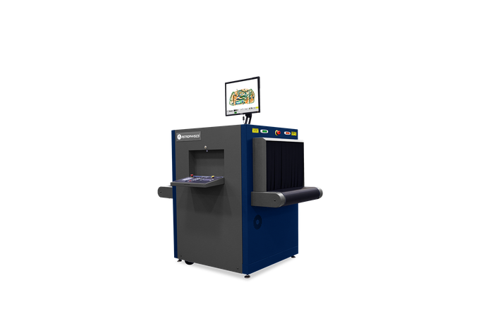
| X-ray baggage scanner | Producing images of bag and parcel contents for inspection. | Personnel screening through a metal detector. |
| Access control system | Managing entry permissions according to the installed system. | Metal detection or baggage imaging. |
When Should You Consider an Integrated Checkpoint?
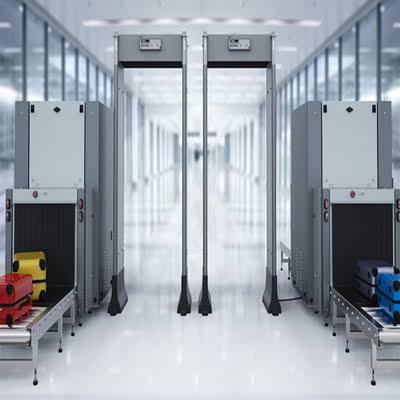
If visitors bring bags, the facility’s policy may require separate but coordinated screening of people and belongings. A designated area for additional checks may also be necessary. Discuss equipment layout through IT Knowledge’s integrated security systems services, defining responsibilities and operating requirements at each stage.
How Should You Compare It with Other Gates?
Use a common set of requirements covering configuration, approved program, installation conditions, training and services. Then assess operational clarity, suitability and technical support alongside the published features. Review the CEIA PMD2 Plus against your actual site needs rather than treating a single specification as proof of overall superiority.
You can start with IT Knowledge’s security gate services and request comparable proposals. This helps distinguish differences in detector capability from differences caused by accessories, installation or support excluded from one quotation.
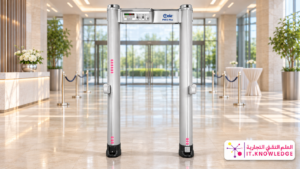
Should You Purchase or Rent a CEIA PMD2 Plus?
The decision depends on the duration and frequency of use, operating responsibilities, maintenance and storage. Purchasing may suit an ongoing requirement at a fixed location. Walk-through metal detector rental is worth considering for events and temporary projects. Compare total costs and required services, with availability and terms confirmed when you request a quotation.
When Does Purchasing Make Sense?
For regular use, compare the expected ownership cost, including equipment, accessories, installation, training and service. When purchasing a CEIA PMD2 Plus, request the warranty provider’s details, coverage terms, support process and handover documentation. These items help define what the purchase includes beyond the physical detector.
Appoint someone within the facility to maintain equipment records, record concerns and coordinate technical assistance. Ownership does not remove the need for operational checks. Metal detector maintenance may require a separate service agreement or additional arrangements, depending on the warranty, usage and agreed scope.
When Is Rental More Suitable?
Rental may suit a conference, exhibition or time-limited requirement where permanent ownership is unnecessary. However, metal detector rental should clearly define the equipment, quantity, period, transport, installation, testing, support, removal and collection. This establishes the service and financial scope from delivery through the end of use.
When requesting a CEIA PMD2 Plus for an event, distinguish the delivery date, public operating period and collection date. The equipment may remain on site longer than the event itself. Confirm how that period is charged and whether setup, testing or removal days affect the rental price.
| Comparison Point | Purchase | Rental |
|---|---|---|
| Period of use | Worth assessing for regular or ongoing operation. | Worth assessing for temporary or defined periods. |
| Cost assessment | Consider ownership and service costs over the expected period. | Consider the rental period, included services and extensions. |
| Maintenance and support | Determined by warranty and service terms. | Determined by the rental agreement’s support scope. |
| Transport and storage | Arrange for relocation or periods when equipment is not in use. | Define delivery, removal and collection in the quotation. |
Does Rental Include an Operator Throughout the Event?
Do not assume that “installation and operation” includes continuous staffing. The phrase may refer to technical setup, testing and handover, while an operator throughout the event requires a separate agreement. When arranging metal detector rental, clarify who performs screening, who provides technical support and the number of personnel and coverage hours required.
Review IT Knowledge’s security equipment rental services, then request a proposal identifying the CEIA PMD2 Plus configuration and required services. Confirm dates, extension terms, cancellation conditions and exclusions before accepting the booking.
Request Specifications and a Suitable Quotation
Contact IT Knowledge to discuss the appropriate configuration and sales, rental or maintenance requirements. Share the location, period of use, quantity and target date, and request a clear distinction between included and optional equipment and services.
CEIA PMD2 Plus Installation: From Site Review to Operation
Checkpoint readiness begins before the equipment arrives. Space for the detector’s frame is only one requirement: pedestrian flow, the operator’s position, electrical supply and the area for additional checks must also be considered. Install the CEIA PMD2 Plus within a plan that fits the entrance and the facility’s approved procedures, with responsibilities established before work begins.
When requesting a walk-through metal detector, ask for a written list of site preparation requirements. Clarify what the facility must provide, what the supplier includes and whether access permits or building management coordination are necessary. This helps prevent delays caused by requirements that were not discussed before the installation visit.
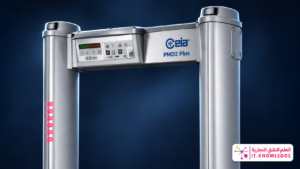
Step 1: Review the Entrance and Pedestrian Routes
Identify the waiting area, passage route and location for additional inspection, taking account of the facility’s circulation, evacuation and accessibility requirements. The CEIA PMD2 Plus should not create congestion or interfere with essential entrance functions. Establish where personnel will guide users, observe indications and manage any follow-up checks.
If the checkpoint includes baggage screening or other equipment, review how people and belongings move between stages. Personnel screening gates, inspection equipment and belongings tables need a coordinated layout. Each operator should understand their responsibility and how the workflow proceeds under the approved screening policy.
Step 2: Confirm Installation and Power Requirements
Review the supporting surface, fixing arrangements, connections and surrounding conditions against the instructions for the supplied configuration. Qualified personnel should assess the CEIA PMD2 Plus requirements and identify any additional site work. Do not rely on general assumptions about electrical arrangements or equipment positioning without checking the relevant documentation.
Where nearby equipment or surrounding structures may affect operation, include them in the technical review. If several walk-through metal detectors will operate in the same area, their positioning and setup should follow manufacturer instructions and the site assessment. Performance should then be verified before the installation is accepted.
Step 3: Complete Technical Installation and Setup
Once the site is ready, the equipment is installed and its fixing and connections are checked. Setup should then follow the equipment instructions and the requirements established by the organization responsible for security. Access to CEIA PMD2 Plus settings and permission to change them should be assigned to authorized personnel.
Ask whether the quotation includes one installation visit and what happens if the location is not ready on the scheduled date. This matters when arranging metal detector rental for events, where contractor access may be restricted and delays can reduce the time available for testing and training before visitors arrive.
Step 4: Carry Out Acceptance Testing and Record the Results
Agree on the acceptance test scope, attendees and method of recording results before installation. The CEIA PMD2 Plus should be tested by qualified personnel using suitable approved test methods, in accordance with manufacturer instructions and site procedures. Acceptance should be linked to documented checks rather than simply demonstrating that the equipment powers on.
The operational review should also cover signal clarity, staff understanding and route readiness. Effective use of personnel screening gates requires coordination between equipment, people and procedures. Record outstanding observations, assign responsibility for resolving them and verify closure before completing the agreed handover.
| Stage | What to Check | Required Record |
|---|---|---|
| Before installation | Space, routes, power and site preparation. | Confirmation of requirements and responsibilities. |
| During installation | Equipment, accessories, fixing and connections. | Record of supplied equipment and completed work. |
| Acceptance testing | Performance against the agreed acceptance procedure. | Documented results and outstanding observations. |
| Handover | Training, documentation and support contacts. | Handover record identifying equipment and service status. |
Should the Detector Be Checked After Relocation?
Moving equipment can change its installation conditions, power arrangements and surroundings. A technical review, setup check and further testing may therefore be necessary under the equipment instructions. Do not assume the CEIA PMD2 Plus is ready for a new location simply because it has been reconnected to power.
If metal detector rental involves several locations or movements between event stages, explain this when requesting the quotation. Define removal, transport, reinstallation and testing dates, responsibility for protecting the equipment and any effect on cost or service duration.
Operator Training: Turning Equipment Features into Practical Use
Training helps operators understand indications, follow the alarm response process, recognize the limits of their authority and know when to request assistance. Ask for training relevant to the CEIA PMD2 Plus and your facility’s procedures. Establish the participants, language, available documentation and how understanding of assigned duties will be checked.
- Understanding the operating interface and basic indications.
- Following startup procedures and prescribed operational checks.
- Responding to alarms under the facility’s policy.
- Distinguishing operator permissions from supervisor permissions.
- Recording observations and reporting faults.
- Following care instructions for equipment components.
- Contacting technical support and supplying the necessary information.
Confirm whether training covers all shifts or a selected group, and identify who will train new users later. When handing over personnel screening gates, recording the attendees and documents supplied helps preserve operating knowledge and reduces reliance on a single employee or informal verbal instructions.
Technical Training Is Different from Continuous Event Staffing
A proposal may include CEIA PMD2 Plus setup and training for the client’s employees, while providing an operator throughout the event requires a separate agreement. If staffing is required, define personnel numbers, coverage hours, duties and responsibility for managing the screening procedure.
Metal Detector Maintenance and Technical Support
Facilities need a clear process for handling equipment concerns, whether the detector is owned or rented. Metal detector maintenance begins with identifying the equipment, symptoms and conditions in which an issue occurs, followed by assessment by the appropriate technical team. Equipment details and service records help organize diagnosis and document completed work.
Equipment reliability does not remove the need for monitoring. Review the manufacturer’s instructions and an appropriate service plan for your CEIA PMD2 Plus. Distinguish operational checks performed by an authorized user from maintenance requiring technical intervention, and establish who decides the response when performance appears abnormal.
What Is the Difference Between Routine Inspection and Repair?
Routine inspection reviews equipment condition under an agreed plan. Repair addresses an identified fault requiring diagnosis and corrective work. Visits, materials and replacement parts included in metal detector maintenance depend on the service agreement. The quotation should therefore define coverage, exclusions and the process for requesting assistance.
Ask what terms such as “comprehensive maintenance” or “technical support” include. Do they cover visits, travel, parts and post-repair testing? What are the service hours, and which activities require approval or additional payment? Written answers make the CEIA PMD2 Plus service scope easier to assess and manage.
What Information Should You Provide When Reporting an Issue?
- Model, configuration and available serial number.
- Equipment location and responsible contact person.
- A description of the issue, when it started and how often it occurs.
- Photographs of displayed messages or indicators, where applicable.
- Recent relocation or changes to the site or power arrangements.
- Warranty or service agreement details and available maintenance history.
This information supports assessment but does not replace technical diagnosis. Do not open components or change protected settings without authorization and appropriate instructions. Follow the facility’s procedure when a walk-through metal detector is suspected of malfunctioning, and coordinate the next step with the technical service provider.
Does the Warranty Cover All Maintenance?
Coverage depends on the warranty document and the cause of the issue. Warranty and service agreements may differ in duration, scope and exclusions. When purchasing a CEIA PMD2 Plus, identify the warranty provider, claim procedure and whether visits, parts or transport are included or require a separate arrangement.
For rental equipment, review response arrangements, the process for dealing with downtime and replacement equipment if explicitly included. Do not assume a spare unit or continuous coverage is provided simply because support is mentioned. These terms should be established within the metal detector rental agreement, together with responsibility for damage and its reporting.
CEIA PMD2 Plus Pricing: How to Request an Accurate Quotation
The product name alone does not establish the total cost. Configuration, accessories, quantity, location, installation, training and service can all affect a proposal. Request CEIA PMD2 Plus pricing with a detailed scope identifying inclusions, exclusions, quotation validity, delivery arrangements and payment terms.
For rental, compare the period of use, delivery and removal dates and technical coverage. A metal detector rental quotation should identify when the chargeable period begins and ends, extension terms and any additional costs arising from changes to location, timing or equipment quantity.
Which Items Should You Check Before Accepting a Price?
| Item | Question to Ask | Why It Matters |
|---|---|---|
| Configuration | Are the model and accessories clearly identified? | Avoids treating different configurations as equivalent. |
| Transport and installation | Does the price include delivery and site installation? | Clarifies the cost of reaching operational readiness. |
| Training and testing | Who receives training, and how is acceptance documented? | Defines handover requirements and staff responsibilities. |
| Maintenance and support | What are the coverage, service hours and exclusions? | Establishes the service available after installation. |
| Rental extensions | How are the rental period and extensions calculated? | Clarifies additional days and related service charges. |
| Total and tax | Are the total and applicable tax treatment stated? | Shows the complete financial commitment. |
How Can You Compare Two Quotations Fairly?
Use the same configuration, quantity, accessories, location and service requirements, then compare schedules, warranty and exclusions. A CEIA PMD2 Plus quotation may appear less expensive because it excludes work included elsewhere. Record unclear items and request written clarification before making the decision.
If continuity is a priority, assess the written response and support scope alongside equipment cost. Comparing metal detector maintenance, training and warranty arrangements helps explain the proposal’s value during use. Neither the lowest nor the highest price is automatically the best fit for every site.
Useful Links for Defining Your Project Scope
- Security gate services for discussing suitable personnel screening options.
- Security equipment rental for temporary requirements and events.
- Integrated security systems for coordinating equipment within the site.
- Official CEIA documentation for model and configuration references.
Prepare Your Technical and Commercial Request
Share the location, required date and quantity with IT Knowledge to discuss the CEIA PMD2 Plus. Request a written proposal covering the configuration, installation, training, support and relevant warranty or rental terms.
Frequently Asked Questions About the CEIA PMD2 Plus
Before ordering, clarify equipment suitability, configuration, service scope and costs. The following questions help organize your CEIA PMD2 Plus enquiry. Your quotation, technical documentation and agreement should remain the reference for the equipment and services being supplied.
Is the CEIA PMD2 Plus Suitable for My Facility?
Suitability depends on the location, screening requirements, entrance layout and installation conditions. Provide photographs, dimensions, operating periods and peak arrival times, then request a technical assessment. A configuration used by a similar organization should not automatically be assumed appropriate for your site.
Is the Equipment Available for Sale and Rental?
IT Knowledge’s product page presents sales and rental options. Actual availability, configuration, quantity and delivery dates must be confirmed when you enquire. For an event, specify installation, testing, public operating and collection dates so the CEIA PMD2 Plus proposal covers the complete period required.
Can I Request a Price Before a Site Visit?
An initial quotation may be possible when sufficient information is available. Some items may require a site review or further details. Ask which assumptions support the price and whether transport, installation, training, accessories and applicable tax are included. A clearly defined walk-through metal detector scope makes financial comparisons more useful.
Do All Configurations Have the Same Dimensions and Accessories?
Do not assume configurations are identical. Request the complete model designation, dimensional drawing and list of standard and optional equipment. Before approving a CEIA PMD2 Plus order, check that the quotation matches the technical documentation and site requirements, with separately ordered options clearly identified.
Do I Need a Baggage Scanner as Well?
This depends on the facility’s screening policy and the belongings entering the site. A walk-through metal detector does not display images of bag contents. Discuss the task assigned to each device, then establish the layout and operating responsibilities before selecting an integrated checkpoint.
Does the Detector Find Every Prohibited Material?
A metal detector should not be treated as a complete solution for every prohibited material. The CEIA PMD2 Plus detects metallic objects according to its capabilities and configuration. Other screening tasks may require different technologies and procedures selected by the organization responsible for site security.
Does Every Alarm Indicate a Threat?
An alarm requires verification under the facility’s procedures; it does not independently identify the object or its risk. Personal metallic items can affect the response depending on the program and operating conditions. Personnel screening gates therefore require trained staff and a clear additional inspection process.
Must Users Remove All Personal Items Before Passing Through?
The site’s approved procedures determine how belongings are handled. Discrimination features should not be interpreted as a guarantee that every personal item will pass without an alarm. During CEIA PMD2 Plus training, request clear instructions for users and operators that match the required screening policy.
How Many Detectors Will My Event Need?
Total attendance alone is insufficient. Arrival patterns, entrance numbers, staffing and additional inspection procedures all affect checkpoint capacity. When requesting metal detector rental, describe peak periods and the admission window, then ask for an operational review reflecting the event’s actual requirements.
Can Several Detectors Operate at One Entrance?
This requires a technical assessment of the available space, equipment configurations and manufacturer instructions. Do not adopt general spacing assumptions without review. Request a layout for the CEIA PMD2 Plus units and associated equipment, with installation, setup and testing requirements confirmed before acceptance.
Can It Be Used Outdoors?
Review the exact configuration, component protection, site conditions and manufacturer instructions. Request environmental protection details and arrangements for power, fixing and operation. A general description such as “outdoor suitable” should not replace confirmation that the proposed walk-through metal detector meets the intended location’s requirements.
Does Rental Include Delivery, Installation and Removal?
These items should be listed in the quotation. Clarify transport, unloading, installation, testing, removal and collection, including responsibility for each activity. When arranging metal detector rental, specify contractor access hours, site readiness and terms for additional visits or changes to the schedule.
Does “Operation” Include an Employee Throughout the Event?
Not necessarily. It may describe technical setup, testing and handover, while continuous staffing requires a separate agreement. For your CEIA PMD2 Plus enquiry, specify whether you need training for your team or operational coverage, including personnel numbers, working hours and assigned responsibilities.
Can the Rental Period Be Extended?
Extensions depend on availability and the agreed terms. Ask how additional days are calculated, when an extension must be requested and whether it affects transport or support. Do not assume metal detector rental continues automatically; document approval, the revised period and associated charges.
Should the Equipment Be Tested After Relocation?
Relocation can change installation conditions, power arrangements and the surrounding environment. The CEIA PMD2 Plus should be reviewed and checked under the manufacturer’s instructions before further use. If frequent moves are expected, include removal, protection, transport, reinstallation and testing within the service scope.
Can Any Employee Change the Settings?
Permissions should be assigned and protected under the facility’s policy and equipment instructions. Operators need to understand their authority, while significant configuration changes should be restricted to authorized personnel. At handover, identify who manages settings and how approved changes are recorded.
What Should I Do If an Error Message Appears?
Follow the facility’s approved procedure and record the message, time, circumstances and recent site changes. Contact technical support rather than bypassing faults or changing protected parameters without authorization. Metal detector maintenance starts with appropriate diagnosis before corrective work is performed.
Does the Warranty Include Parts and Site Visits?
Coverage depends on the warranty, quotation and cause of the fault. Ask which parts, labor and travel costs are included or excluded, and distinguish warranty coverage from a service agreement. Keep the CEIA PMD2 Plus documentation, equipment details and support request procedure available for future reference.
Is Replacement Equipment Supplied During Repairs?
Do not assume a replacement is included unless it is stated in the agreement. Ask about downtime arrangements, response coverage and replacement conditions if available. Establishing these terms before arranging metal detector rental clarifies the agreed options if an issue occurs during use.
Which Documents Should Be Provided at Handover?
Request the configuration’s technical documentation, accessory list, available operating instructions, warranty or rental documents, acceptance records and support contacts. The CEIA PMD2 Plus handover documents should identify what was supplied, outstanding observations and responsibility for resolving them.
How Should I Choose Between Different Prices?
First compare equivalent scopes. Prices may differ because of configuration, accessories, training, installation, warranty or service. Record the differences and request clarification, then assess total cost and operational value against your priorities rather than choosing solely by the lowest initial figure.
How Can I Request a Quotation from IT Knowledge?
Send the facility type, city, entrance photographs, required quantity, period of use and target date. Specify purchase or rental and the services needed. To discuss the CEIA PMD2 Plus, call +966 54 188 2204 or contact IT Knowledge on WhatsApp, then request a written proposal covering the agreed details.
Checklist Before Accepting Your Quotation
Before signing, confirm that the proposal turns your requirements into defined commitments. Selecting a CEIA PMD2 Plus involves coordinating equipment, service and procedures, with each party understanding its responsibilities before installation and operation.
- Exact configuration, quantity, equipment and accessories.
- Equipment condition and supply or rental terms.
- Installation location and site preparation requirements.
- Transport, installation, testing and training.
- Operating and technical support responsibilities.
- Warranty, maintenance coverage and exclusions.
- Total price, applicable tax treatment and payment terms.
- Dates and rental extension or cancellation conditions.
- Handover documents, contacts and outstanding issue procedures.
Related Security Checkpoint Services
An enquiry may begin with one detector and develop into a requirement for coordinated equipment and services. Use the following pages to identify questions to discuss with IT Knowledge before confirming your project scope.
- Security gate services for discussing personnel screening and metal detection options.
- Security equipment rental for temporary requirements, events and projects.
- Integrated security systems for coordinating the equipment and services required.
- CEIA PMD2 Plus product information for the equipment presentation on IT Knowledge’s website.
Manufacturer References
For technical reference, consult the official CEIA PMD2 Plus product page and CEIA document library. Match published information to the quoted configuration, as features and options can differ according to the equipment being supplied.
Choose Equipment and Services That Fit Your Site
Selecting a CEIA PMD2 Plus starts with understanding the requirement, identifying the configuration and reviewing installation, training and support. Clear scope makes quotations easier to assess and establishes operating responsibilities before handover. Equipment specifications should be supported by documented procedures and a team that understands how to use the system.
سواء كنت تُجهّز مدخل منشأة أو تُخطط لفعالية، ناقش احتياجاتك مع قسم تكنولوجيا المعلومات واطلب عرضًا مكتوبًا يشمل المعدات والخدمات والتواريخ. تعامل مع جهاز الكشف عن المعادن كجزء من نقطة تفتيش مُنسقة تتناسب مع الموقع ومتطلبات الجهة المسؤولة عن الأمن.
اطلب عرض سعر CEIA PMD2 Plus من IT Knowledge
للاستفسارات المتعلقة بالمبيعات والتأجير والصيانة، يرجى تحديد موقعك والكمية وفترة الاستخدام والتاريخ المستهدف. ناقش التكوين والملحقات والتركيب والتدريب والدعم الفني المطلوب لمشروعك.